Press Ctrl+K (Cmd+K on a Mac) and type. The same box searches page titles and text, finds boards, forms and sheets by name, and runs commands such as New page, Go to Settings or Theme: Dark.
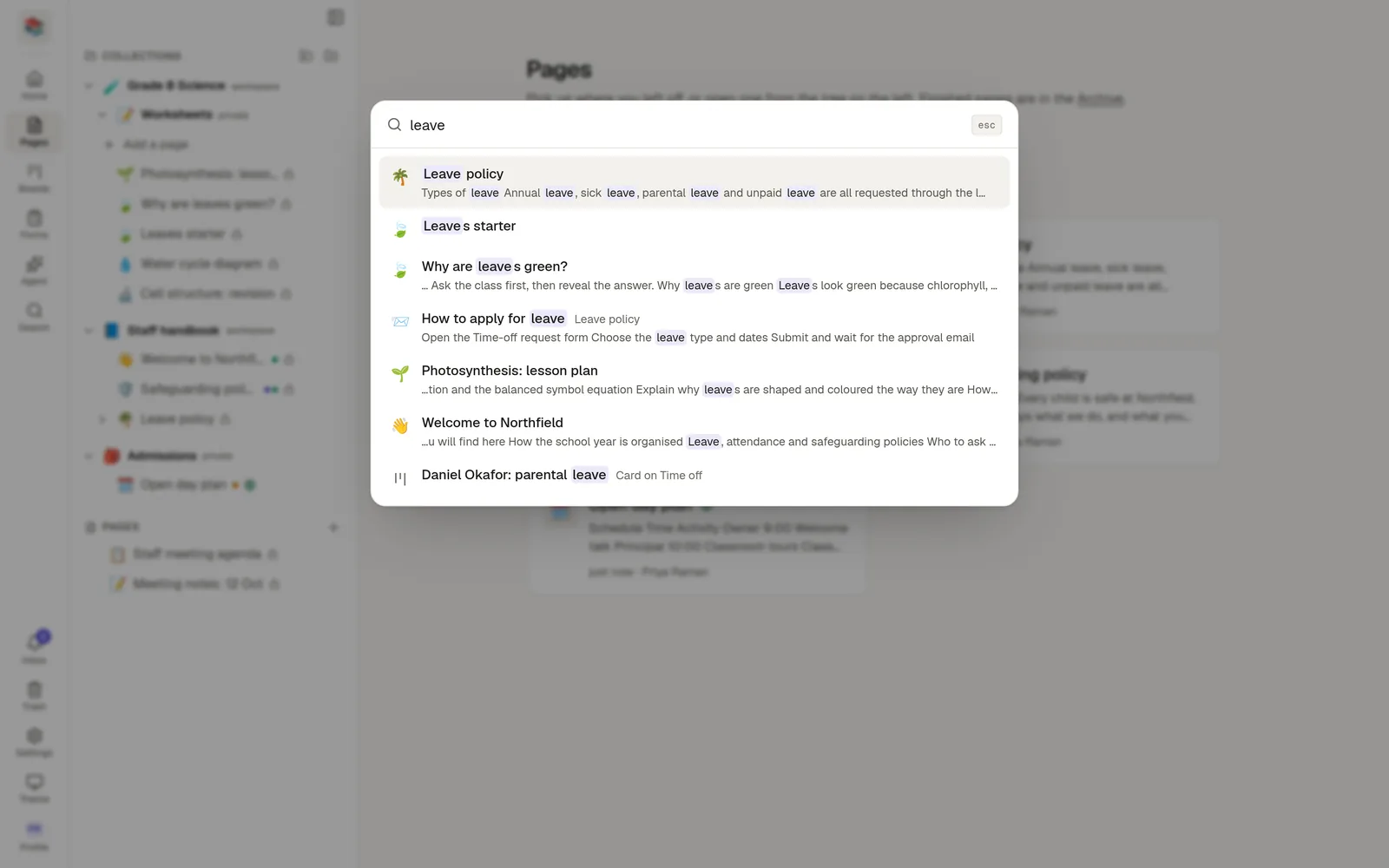
Open search
Press Ctrl+K (or Cmd+K) anywhere in the workspace, or
choose Search in the left rail, or
on a phone, tap the magnifier in the top bar.
Search
Type a few words. A page must contain every word, in its title or in its text, and partial words work, so leav finds leave.
Results are ranked so the best match comes first:
A page whose title is your whole phrase comes first.
Matches in a title count for more than matches in the text.
Pages you changed recently, and pages you open often, rank a little higher.
Each result shows its title, where it sits, and a short passage with your words highlighted.
What it finds
Pages, including their sub-pages, with the collection or parent shown beside the title.
Board cards, labelled with the board they belong to.
Boards, forms and sheets, by their name.
You only see what you have access to. A private page that is not shared with you never appears.
Run a command
With nothing typed, the box lists the commands you can use, in groups:
Group | Commands |
|---|---|
Create | New page, Import files, New collection, New board, New form, New sheet, New workspace |
Go to | Home, Pages, Boards, Sheets, Forms, Agent, Inbox, Archive, Trash, Settings, Members, Profile, Security, Admin |
Appearance | Theme: Light, Theme: Dark, Theme: System (the current one is marked) |
Account | Sign out |
Workspaces | Switch to each of your other workspaces |
Start typing to narrow the list. Every word you type has to match a command's name or a word related to it, so "dark", "invite" or "log out" find Theme: Dark, Members and Sign out. Matching commands appear above the search results. Begin with > to see commands only.
Commands that start something open the same window as the button would. New form, New board and New sheet tell you if your plan has reached its limit instead of opening.
You only see commands that apply to you. Create is hidden in a workspace that has become read-only, Boards, Forms, Sheets and Agent appear only when your workspace has them, and Admin only for administrators.
Open a result
Use the ↑ and ↓ keys to move through the list and press Enter to open one, or click it. A page opens, and the Pages panel opens the collections above it and highlights it, so you can see where it lives. Press Esc to close the box without opening anything.
Good to know
Pages in the archive and the trash are left out of results.
Search does not look inside form responses or the rows of a sheet.
Tip: search for a person's name to find the pages where they were mentioned.